
- No app store and no passwords
- Works with no signal
- Free until 31 December 2026
- Only offers the days and times you can deliver
- Requests hold their slot until you decide
RecyclyERP 2026.17 takes your collections onto the road: plan every driver's day on a map, send it to their phone, and have the signed Waste Transfer Note back with your customer before the vehicle has left the site. Alongside it come Online Collection Requests where your customers pick a date and time, returns your customers can raise and track on their Customer Portal, hardware audit results that grade items for you, a safe way to merge duplicate Asset Types, and a proper process for scrap.
This release focuses on Route Planning & Driver Hub, Online Collection Requests, the Customer Portal, Inbound Orders & Collections, Hardware Auditing & Grading, Items & Lots, Asset Types, Outbound Orders, Document Templates, Invoicing and Settings - with new features added to your Setup Assistant so you don't miss them.
Release Highlights
- Route Planning and Driver Hub: Plan each driver's day by dragging collections onto a route on a map, with arrival times and the quickest stop order worked out for you, and give your drivers Driver Hub: a phone app with no app store which remains secure without passwords and captures counts, photos, seal numbers and signatures at the customer's site and keeps working with no signal.
- Online Collection Requests: Customers and website visitors pick a date and time on your Book a Collection form from the availability you set, and your staff approve or decline each request from one screen, with the customer emailed either way.
- More for your customers on the Customer Portal: Your customers can now see and track their returns and request a return online, open a quarterly Service Review of what you processed for them and the certificates that go with it, keep their own site access details up to date, and download a Data Erasure or Data Destruction Certificate per device.
- Hardware audit results drive grading: Test results and defect codes from your audit reports now land on the item as attributes and feed your Grading Rules, and every Hardware Audit Report opens with a new Erasure Summary of what was erased, when and to which standard.
- Merge Asset Types: Merge a duplicate Asset Type into the one you want to keep, with a full preview of what will move, change and stay behind, a change log, and an undo.
- Scrap Management: Scrap items and remove them from stock in one step, with a preview of what will happen, checks that stop a scrap when an item is still on an order, and new filters to keep track of what has gone.
And that is just the start. Read on for everything in 2026.17.
Spotlight: Route Planning & Driver Hub
Plan it in the office, collect it on the road.
See Route Planning and Driver Hub at work, from planning the day's collections to the signed Waste Transfer Note. If the video does not play here, watch it on YouTube.
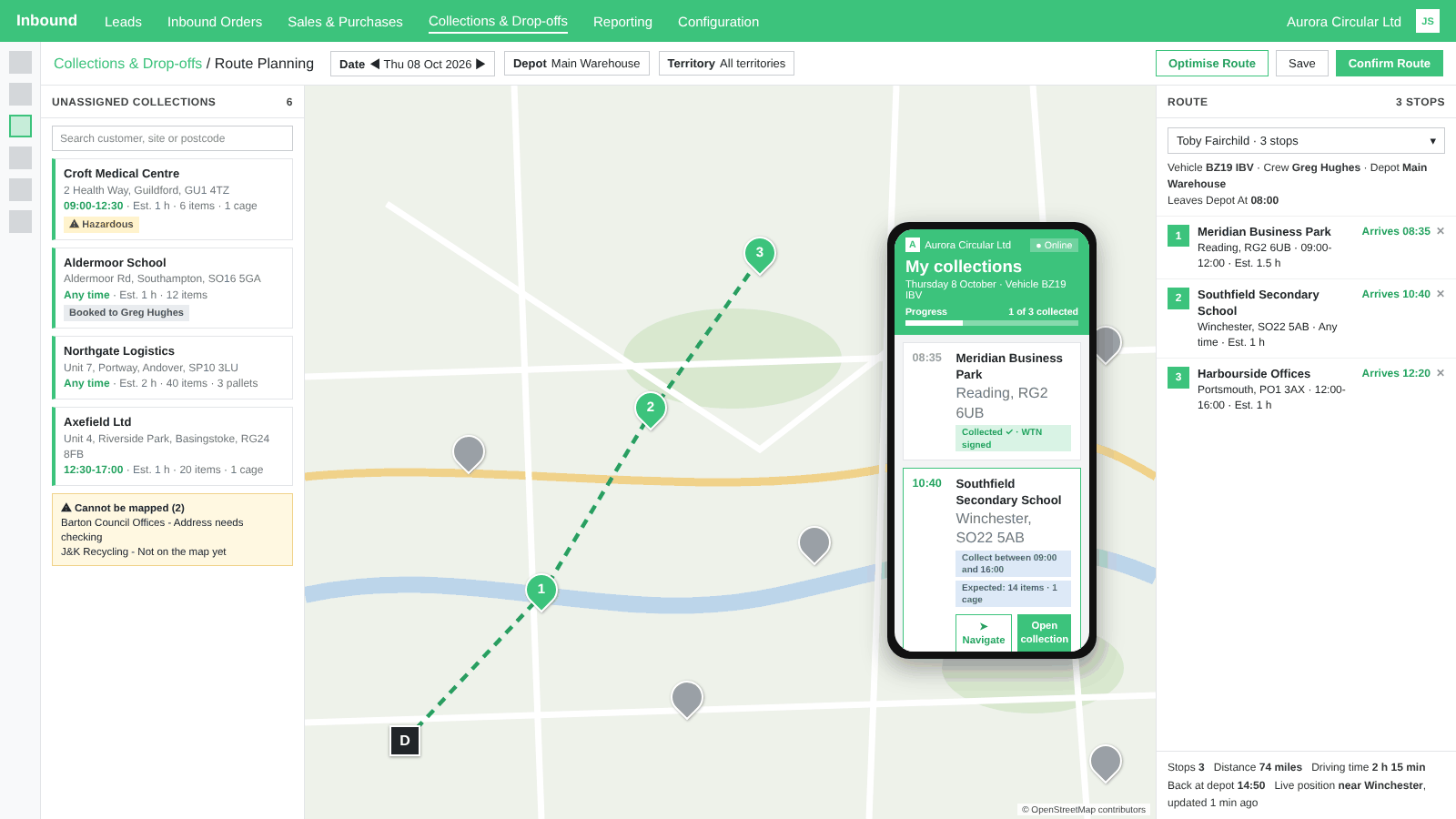
In the office, every collection now sits on a map with its time window, and RecyclyERP warns you before a driver, crew member or vehicle is double-booked. The new Route Planning board lets you drag collections onto each driver's route, put the stops in order and confirm it, with arrival times, distance and driving time worked out by your maps provider. Optimise Route puts the stops in the quickest order in one click, and the board warns you before a route over-fills the vehicle. Once the vehicles are out, their live positions show on the board, from Driver Hub or from a vehicle tracker.
Your customers see the expected arrival time and a tracking link on their Customer Portal, and the signed Waste Transfer Note is emailed to them and shown on the portal the moment the driver finishes.
Driver Hub is RecyclyERP's new app for collection drivers. It installs on an iPhone or Android phone from your own RecyclyERP address, with no app store, and the office signs a driver in with a QR code rather than a password; after that, the driver unlocks it with their face or fingerprint. Driver Hub is free until 31 December 2026 while we use live customer feedback to make it more resilient and add the must-have features. From 1 January 2027, drivers who also have a full, paid RecyclyERP user account stay free, and drivers with Driver Hub access only are £7.50 + VAT per driver per month, to help cover hosting, support and ongoing improvements.
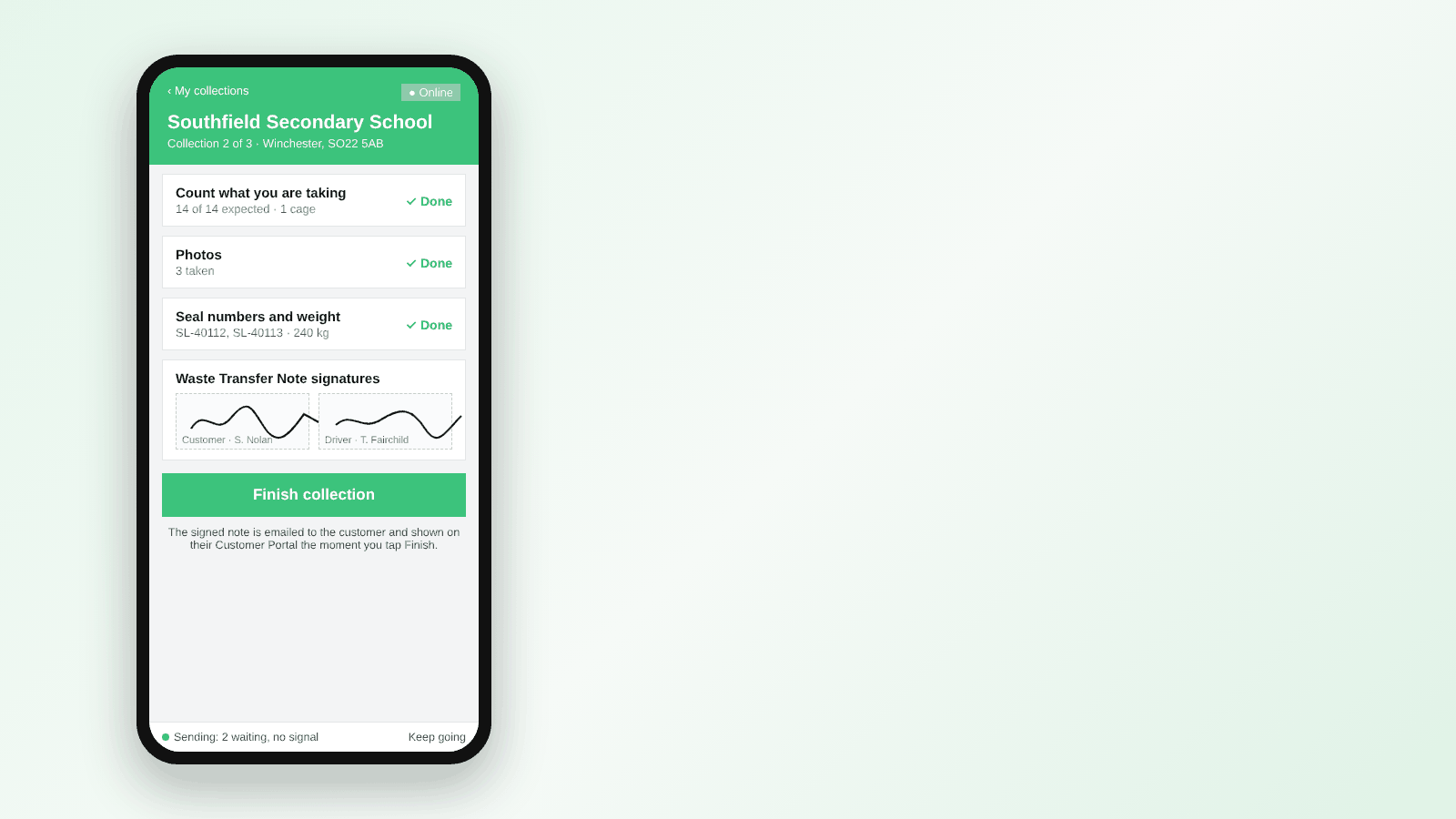
Each driver sees their collections for the day in order, with the time window, the contact, what to expect and any access notes, confirms their vehicle and taps once to navigate. At the customer's site they count what they are taking against what was expected, take photos, record seal numbers and the load weight, and get the Waste Transfer Note signed on screen by the customer and by themselves. The signed note is attached to the collection, emailed to the customer and shown on their Customer Portal the moment the driver taps Finish. If nobody is there to sign, the driver records why, with a photo, and the collection still goes ahead. If nothing can be collected, the driver records the reason and the office is asked to rebook. Back at the depot, the driver confirms they have arrived and the load is handed over to Booking In.
It all works with no signal. Today's collections and their documents are saved on the phone, everything the driver records is kept until it can be sent, and a Sending screen shows what is waiting and what has gone.
To get started, choose your maps provider under Settings > Inbound > Route Planning & Maps, give your planners Route Planner access and open Inbound > Collections & Drop-offs > Route Planning. For drivers, open a driver's employee record, go to the Driver Hub tab and click Invite to Driver Hub. Two guides for drivers are on the Knowledgebase, Installing and logging in to Driver Hub and Doing a collection, including no signal, and one for the office, Setting up drivers for Driver Hub.
Route Planning
- Collection addresses are placed on the map automatically in the background, using the maps provider you choose under Settings > Inbound > Route Planning & Maps; only the address itself is ever sent, never names, phone numbers or emails.
- Addresses the map cannot place are set aside for checking rather than lost: each one carries a plain-English reason, a Located Roughly status with a match confidence where the map was unsure, an Address Needs Checking filter on the Collections list and a Confirm Location Is Correct button.
- A new Collect Between window on every collection, filled in automatically from online bookings, with an amber warning when the Scheduled Date falls outside it and an optional Collection Window column on the Collections list.
- A warning before a driver, crew member, vehicle or someone on approved time off is double-booked, shown on the collection's Vehicles & Personnel tab; it warns, never blocks, and a new Minimum Gap Between Jobs setting allows for travel time between sites.
- Routes: one driver's day as an ordered run of collections, under Inbound > Collections & Drop-offs, with the driver, crew, vehicle, depot and Leaves Depot At time, a status from Draft to Done, and a printable, editable Driver Run Sheet Document Template with site access details for every stop.
- The Route Planning board puts unassigned collections on the left, the map in the centre and the selected driver's route on the right, filtered by date, depot and territory, with a search box and a Cannot Be Mapped area for the day's collections the map could not place.
- Drag a collection onto a driver's route, drop it between two stops, drag stops to reorder, then Save or Confirm Route to send it to the driver's phone; two planners can never overwrite each other, and drag-and-drop works by touch on a tablet.
- Arrival times, distance and driving time from your maps provider on every stop, shown on the board, the route, the Routes list and the driver's phone; a stop that would arrive before its window opens waits for it, and the stops after it count on from the wait.
- Optimise Route puts the stops in the quickest order in one click, keeping each collection inside its window where possible, with an Undo and a line saying how much driving time it saved. The board's help panel links to the new Optimising routes guide.
- Vehicle capacity and expected load: a warning before a vehicle is over-filled.
- Live vehicle positions on the board, from Driver Hub and from a vehicle tracker, with the day's track for the selected driver; positions are only ever seen by your route planners.
- Your customers see the expected arrival time on their Customer Portal, with a tracking link.
- New Can Be Driver and Can Be Crew tick boxes on the user form, and Driver and Crew columns on the Users and Employees lists that can be set for several people at once; the Driver and crew lists on a collection or a vehicle now open for everyone who can open that screen.
- Archive or delete an employee and their login together, never one without the other, with a confirmation on the Employees and Users lists.
- The Inbound > Collections & Drop-offs menu is grouped with separator lines, so Collection Requests, Route Planning, Routes and Driver Hub sit together, and the help panels on these screens say which devices each screen is made for.
Driver Hub
- Driver logins are separate from RecyclyERP users: a driver's Driver Hub login never counts as a RecyclyERP user, and only ever sees that driver's own collections.
- Driver Hub installs from your RecyclyERP address and updates itself, checking for a new version every time it is opened.
- One-tap sign-in by QR code or sign-in code from the driver's employee record, where a new Driver Hub tab lists every signed-in phone and can sign out a lost phone in one click; the code can also be emailed to the driver with an editable email template.
- The driver unlocks the app with their face or fingerprint, with a 6-digit code as the fallback.
- My collections shows the day's collections in route order, with the time window, the contact, what to expect, any access notes and the collection number and Job ID on every card; Navigate opens the driver's own sat nav app, and the driver confirms their vehicle at the start of the day so the Waste Transfer Note carries the real registration.
- The driver can look at another day's collections, read-only.
- Proof of collection: counts against what was expected, up to 10 photos, seal numbers, the load weight and two named signatures, with a Could Not Collect route that flags the collection as Needs Rebooking; the office sees it all on a new Proof of Collection tab and a Driver Status badge on the collection.
- The driver can scan each item against the customer's declared list, and swipe left to remove an item, box, pallet or cage they added.
- The signed Waste Transfer Note is filled in from the driver's counts, signed on screen by the customer and the driver, attached to the collection, emailed to the customer and shown on the Customer Portal under a new Documents heading; a new Driver Hub section in Settings > Inbound chooses whether the Duty of Care Document is signed too and whether the signed documents are emailed.
- Working with no signal, and sending when back online: today's and tomorrow's collections and their documents are kept on the phone, nothing is lost to aeroplane mode, a restart, a flat battery or a full phone, nothing is ever sent twice, and the office can see a week of what each phone has sent.
- The two drivers' guides are inside Driver Hub and kept on the phone for no signal.
- Back at the depot, the driver confirms their arrival and unloading, and the load is handed over to Booking In; drop-off customers sign at the warehouse.
- A collection marked "could not collect" can be reopened so the driver can still collect it.
- Small things that matter on a phone: bigger text for the back link, the reference line and the step names, quick taps on - and + that count every time without zooming the screen, and a note that appears on both the site and the collection shown once.
- Every screen says "vehicle" rather than "van", because your fleet is not all vans, and what Driver Hub costs is said on screen before you invite a driver.
Online Collection Requests
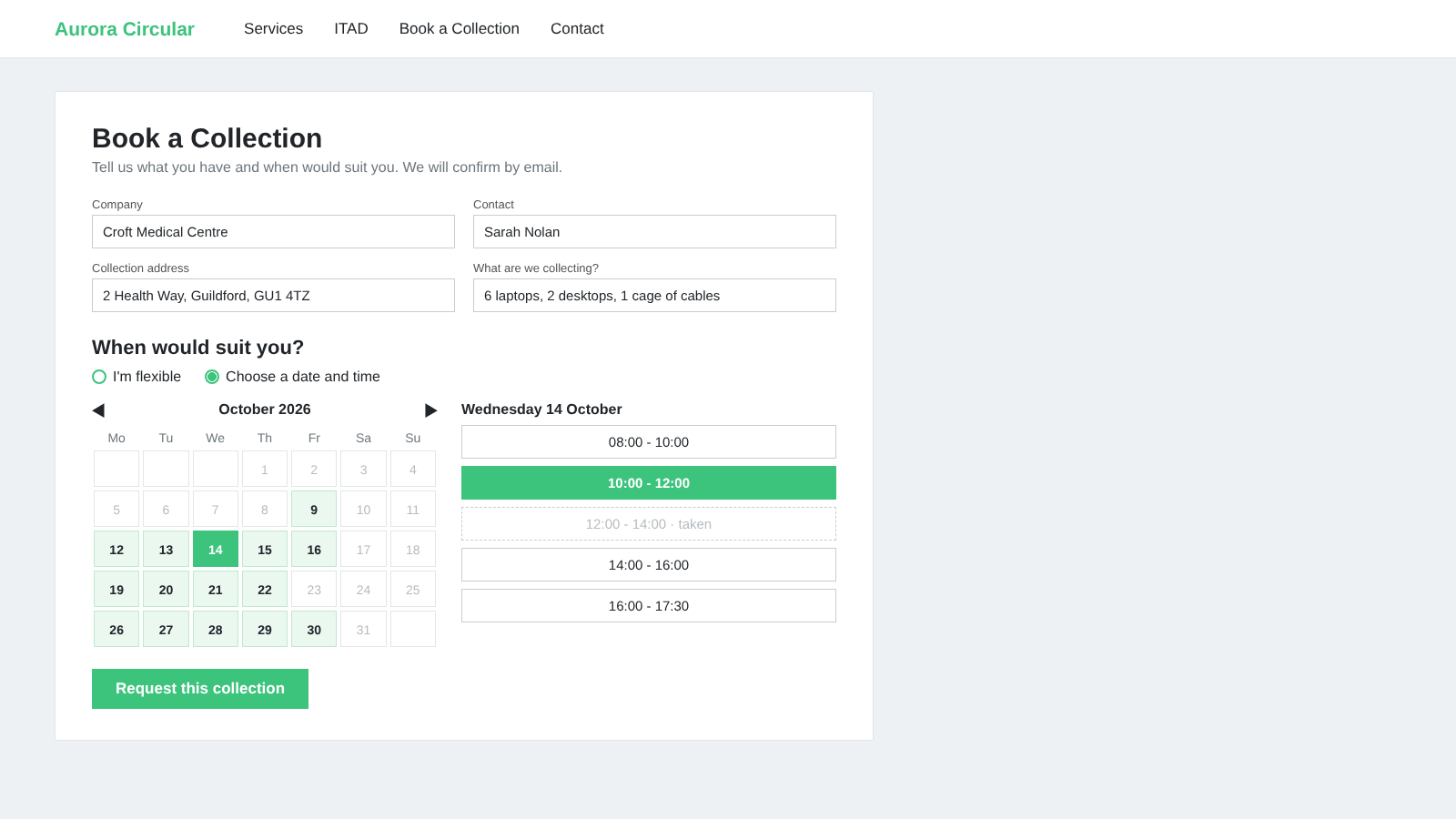
- A new Online Collection Requests section under Settings > Inbound: switch requests on for all customers or per customer, choose whether website visitors can request a date too, and set your availability rules and closed dates, so the booking form only ever offers what you can deliver.
- Your Book a Collection form gains a "When Would Suit You?" section: the customer can stay flexible, or choose a date and time from a calendar that only offers the days and times you make available, in your own time zone.
- Each request gets its own reference and an "Awaiting approval" status, and the customer receives a Collection Request Received email saying it is not yet confirmed; a logged-in customer's request holds its slot until it is approved or declined.
- A new Collection Requests menu under Inbound > Collections & Drop-offs lists what is waiting, as a list or as cards grouped by status, with filters by status, type, source and Waiting For Me.
- Approve and Schedule Collection opens the Schedule Collection screen already filled in with the requested time, so the approver can change anything before confirming; Decline Request and Email Customer sends an optional reason. Both emails are editable templates.
- Choose who approves: a named person, or the customer's salesperson with a named fallback; the approver gets a To Do on the record, and website visitors' requests sit on the Lead until it is converted.
- A waiting request is flagged in red if your availability changes so the time is no longer offered, and marking a Lead lost or cancelling an order frees the slot.
- Switched off, the form works exactly as before, and scheduling a collection the usual way is unchanged.
Customer Portal
- A new Returns card lists the customer's returns with type, item count, return-by date and a plain-English status; each return's page shows what has been received, your return instructions and comments, the key dates, and downloads for the RMA Document and the Return Label with carrier and tracking.
- Request a Return: the customer ticks the items they were sent, gives a reason for each, chooses a replacement, a refund or a credit, and can cancel the request while it is awaiting review; only items still inside their return window are offered.
- Each request arrives as a Draft return with a Raised On The Customer Portal banner and a To Do for the staff member you choose in a new Send Portal Return Requests To setting; the Returns list gains Raised By columns and Awaiting Review and Raised On Portal filters, and when the return is authorised the RMA email goes to the person who raised it.
- Portal returns are off by default: switch them on for all customers, or per customer from the Customer Portal tab, which now shows on every company customer.
- A new Service Review card and page, switched on per customer in the same way as the ESG dashboard. It opens on the most recent complete quarter, with a period picker for the last four quarters, this year, last year or any date range.
- The Service Review shows the items processed by Asset Type and by outcome, the jobs with a Data Erasure or Data Destruction Certificate to download, counts of data-bearing devices wiped or destroyed, and, where you allow it, a financial summary of invoices raised and settlements paid.
- A new Site Access Details card and page where customers see their organisation's and each site's access details, such as lifts, door-entry security and handling equipment, and update the ones you let them, with a new Customers Can Edit tick on each Site Access Field; every change is logged on the record with who made it.
- Collection and enquiry times on the portal are shown in your business's own time zone and say so, whatever the time of year.
- Reports downloaded from a job on the portal now carry their proper document name, and the job's Items & Lots spreadsheet downloads with a clean file name and empty cells left empty.
- Enhancements to portal invitations: the email a portal user sends when adding a colleague carries the company name, the colleague's name, their login and a sign-up link, and Re-invite Existing Contacts Who Have Not Logged In sends a fresh invitation to every contact with portal access who has never signed in.
- Enhancements to simulating a portal user: starting a simulation while one is already running shows a clear "You are already simulating" page with the choice to stop or carry on, every refusal is explained on screen, a company record gains its own Simulate On Portal button, and Impersonate always runs as the person actually signed in.
Inbound Orders & Collections
- Enhancements to Booking In, released early as a hotfix on 2 October: Confirm Scanned Items completes small sessions in one pass and larger ones in batches with progress that visibly advances, scans land on the matching expected line, and a batch that cannot complete says so with a way forward.
- Receive All Into Stock receives everything booked in: the collection becomes Processed and every booked-in item becomes Received with stock in the collection's destination, and a collection with booked lots still expected is held open rather than closed empty.
- Customers booking a collection on your website can choose a Preferred Outcome per type of item, for example Resell or Recycle, which fills in each line's Intended Final Action; off by default, switched on under Settings > Inbound > Collections & Drop-offs, with a Locked tick on Contracts so a contract's action can override the customer's choice.
- Older collections show the right vehicle, driver and crew in the Collections list, groupings, search and calendar, and renaming an employee, a vehicle or a courier updates every collection showing that name.
- Enhancements to saved searches opened from a record's buttons: a search saved on one Inbound Order's Items & Lots, Actual Sales or Open Collections screen now works on every other order, and the same from a collection's Items & Lots button.
- The Hazardous Waste Consignment Note names the courier and the courier's own carrier licence in Part C when a courier collected, always matching the Waste Transfer Note for the same collection.
- Enhancements to Settlements (Beta): a proper status bar with Confirm and Reset To Draft, read-only orders once confirmed, a warning when an order is already on another Settlement, and a conversation and history on every Settlement; on an inbound sales order the green button now reads Confirm Order, since nothing is dispatched.
- Most Recent Collection Date and Next Collection Date on the Address Book count only collections and drop-offs, show the same dates on every contact and site under a company, and update as soon as a collection is booked, moved, completed or cancelled.
Hardware Auditing & Grading
- A new Diagnostics & Test Results attribute category on every item, with 19 test results from motherboard to chassis, each Pass, Fail, Warning or Not Tested, filled in automatically from your hardware audit reports.
- The defect and observation codes your technician recorded land in a new Defects & Observations table on the item, with counts of appearance defects, functional defects and missing parts, and a Defect & Observation Codes list under Hardware Auditing where codes never seen before are added on their own for you to describe.
- Each Hardware Audit Report Source gets a Test Result Mappings tab, so you choose which of your software's tests feeds which test result, and each report gets a Test Results & Defects tab so you can see what was read before pressing Update Item Attributes.
- Grading Rules can now score every test result and every defect count, and an item's grade recalculates on its own when a report lands; a grade set by hand is never overridden.
- Battery original and current capacity, and a new Battery Cycle Count attribute, are filled from reports that carry them, and a new Setup Assistant step reminds you to check how your audit software's tests feed the test results.
- A new Erasure Summary at the top of every Hardware Audit Report: a colour-coded result, the device and serial, the audit software and version, the erasure standard, drives erased and failed, when the erasure started and finished, how long it took and how much of each drive was read back to verify it, so the key facts can be read on one screen without opening the file.
- Every field on a Hardware Audit Report is now available as an optional column on the reports list, and a PDF download link is shown whenever a report has a PDF.
- The hand-entered item grades are now called Manual Grade and Manual Screen Grade, so neither is confused with the automatic Final Item Grade, and the guidance above the manual grade lists explains how the two paths relate.
- Two more ways to release an item held out of sale after a return: completing an Audit on an item with no data storage left in it, or recording a new erasure by hand on its drives, dated after the return. The quick entry drive table gains an Erasure Timestamp column for that date, and the message on a quote or order now names the real reason an item is held.
Items & Lots
- Scrap & Remove From Stock on every item and lot, and from the Items & Lots list, with a screen that shows exactly what will happen first: the items, their location, the Scrap Location they will move to and the Intended Final Action to set; items on an open order or reserved on a delivery are held back with a plain-English message.
- Scrapped items get a Scrapped ribbon, come off eCommerce and can never be added to an Outbound Order, but stay on the Customer Portal, the Inventory Report, certificates, ESG figures and waste tracking exports; new filters show what has been scrapped and what is scrap-complete but still in the warehouse, and a new Scrap Handling section in Settings sets your Scrap Location. A new Knowledgebase guide covers it.
- A new On Quotes column and filter lists every other open quote or draft order that includes an item, so a salesperson can check before promising it twice; nothing is reserved or blocked.
- The Items & Lots board shows each item's Asset Type image, its code, final grade, Asset Type and quantity, inbound order and weight, opens grouped by Location, and carries a colour-coded Data Status badge on every card.
- The Attributes tab fills the full width with alternating shaded rows, one heading per category and drop-downs that look like drop-downs.
- Model Numbers is now Models everywhere, matching the item screens, and its import template gains a Manufacturer column.
- Enhancements to the Location & Packaging tab, which now shows only live receipt lines as Expected rows.
Asset Types
- Merge Asset Types: merge a duplicate Asset Type into the one you want to keep, after a full read-only preview of what will move, what is waiting on unfinished work and what stays behind as history, with the effects on grading, stock value, attributes, sub-types and settings spelt out.
- The merge runs in the background in batches, with a merge record showing progress and a full change log, an Inbox message when it finishes, and a Merge Remaining Items button for anything that was still part of unfinished work; each batch either completes or is rolled back, and your billing figures are checked as it goes.
- Undo a merge, leaving anything used or changed since untouched, with the same preview, confirmation and progress as the merge itself.
- Each Asset Type can now carry a Default Intended Final Action for new items and lots, which a contract's own Asset Type settings can override, with a new optional Setup Assistant action to set them in bulk; where Digital Waste Tracking is on, this is what tells the export how each item will be treated.
- Simpler grouping on the Asset Types, Services and Consumables lists, and a new group-by on EWC Code for Asset Sub-types.
Outbound Orders & Deliveries
- A new Returns column on the Outbound Sales Orders list shows at a glance whether an order has a return raised, is partially returned or fully returned, with an optional No. Returns column and five new filters, on the Outbound Orders report too.
- Each outbound sales line can now be billed on Quantity Quoted or Quantity Delivered, chosen line by line, so one Asset Type covers both ways of working.
- Enhancements to dispatch: Confirm Dispatch on a delivery with nothing reserved now asks you to press Reserve Stock first, a delivery's status always reflects what was actually dispatched, and the Tracking button opens a clearer Delivery Tracking pop-up that says when the delivery method has no courier tracking link.
- Enhancements to the Unreserved Stock and My Orders filters on the Sales Orders list.
Document Templates & Invoicing
- Quotations, sales orders, purchase orders and invoices now print the tax word for your company's country (VAT, GST, Sales Tax and so on), the actual tax rate on the document and the document's own currency code, with a new optional Tax Name box on Company Details to override the automatic word; for a UK company at 20% VAT in pounds, documents read exactly as before.
- New merge fields for the tax number label, tax name, currency symbol, currency code and tax rate, a Commonly Used Fields list for Invoices, and the Merge Fields tab now shows what each Our Company and Contact Details field prints right now.
- Two new Document Templates on the Items & Lots area, Data Erasure Certificate - per item and Data Destruction Certificate - per item: one certificate per device, listing every drive recorded against it with the standard, software, date and operator.
- Produce the per-item certificates from an item's Documents menu, for several ticked items as one PDF, or from an Inbound Order as a ZIP of one PDF per item; customers can download them on the portal item and job pages once you switch Show On Customer Portal on.
- ESG figures are now available to every relevant Document Template area: a Commonly Used Fields list for Environmental Impact Reports, 12 ESG shortcuts on Inbound Order, Collection and Contact templates, and 4 per-item shortcuts on Items & Lots templates, shown while ESG calculations are on; the Customer PO Ref. shortcut on Sales Orders prints the customer's PO reference, and merge field codes show in full on phones and laptops.
- Configurable Tags for invoices, credit notes and bills, for example "Exported to Sage": set them at any status without reopening the invoice, show them as a column, search and group by them, and tag many invoices at once from the list; tags never appear on the printed or emailed invoice.
Setup Assistant
- New Setup Assistant items for the maps provider, inviting drivers to Driver Hub, portal returns, the Preferred Outcome on the booking form, Default Intended Final Actions and your audit software's test result mappings, so nothing in this release is missed.
- The reminder on the main menu comes back when new actions are added, so a new feature is never missed because the reminder was snoozed.
- The Outbound Shipping area gains a Configure Delivery Charge Services action, and the email step opens straight onto the new Email section in Settings.
Settings & Users
- A new Email section in Settings > General Settings shows each of your outgoing email servers with when it was last tested and whether it passed, a Send Test Email To Me button that tells you in plain words if it could not be sent and why, and Emails Not Sent (Last 7 Days) with the most recent reason, so you can see at a glance whether your email works; the Outgoing Email Servers screens link the Microsoft 365 and Google Workspace guides step by step.
- Every portal invitation leaves a line on the contact's Log Note saying whether it was sent or could not be sent and why, and Grant Portal Access reports how many invitations went out.
- A person's name and photo now stay the same on their user, their contact and their employee record: change one and the others follow, with an Also Update tick you can clear for a one-off change, and a duplicated record starts as a clean copy.
- Help panels on the Fleet screens: Vehicles, Contracts, Services, Odometers and the Costs report, explaining how a vehicle is picked on a collection and how its registration reaches the collection's paperwork.
- Settings reopens on the tab and spot you left when you come back through the breadcrumb, and Save on a phone-sized screen puts you back where you were.
- The column picker on every list now finds a column by its other common names, for example Postcode finds Zip, Town finds City and VAT Number finds Tax ID, with the alternatives shown in grey beside each name; address columns are added, hidden by default, to Companies & Contacts, Leads, Opportunities, Collections, Deliveries and Items To Deliver.
Knowledgebase
- Four guides for Leads, Settlements, the Address Book and Ad-Hoc Addresses, written for screens that had none, and linked from their help panels.
- Three new Driver Hub guides: Installing and logging in to Driver Hub, Doing a collection including no signal, and Setting up drivers for Driver Hub, plus the new Optimising routes guide for the Route Planning board.
- A new Scrap Management guide, and three existing guides updated for the new Default Intended Final Action.
- As promised in 2026.16, the Knowledgebase itself is easier to get around: the section menu stays within reach as you scroll a long article, search results come above the Sections tiles, a clear cross empties either search box, and the Previous and Next panels under every article carry arrows with Next always on the right.
- Recycly Infrastructure, Data Security and GDPR Compliance is now a Knowledgebase article in the Security & Compliance section, alongside the GDPR, ISO and Cyber Essentials articles, and the old data security and compliance web addresses take you straight there.
General & Platform-wide Improvements
- Clicking a PDF or image attached in the Send By Email window opens a preview, as it does on a record's messages, instead of downloading the file.
- The Import button appears on board views wherever the matching list offers it, and information panels label their buttons for what they are.
- Blancco Cloud connections can now carry their own service address, so accounts hosted outside Europe, for example in the US, connect too.
The above changes are now available for all customers to use (you might just need to refresh your browser).
Coming soon...
2026.17 is the first release of Route Planning and Driver Hub. Here is a taste of what the team is working on for the coming releases:
- ESG, next phases: Materials and social impact tracking, plus a "Your Effect on the Planet" view for eCommerce shoppers.
- Digital Waste Tracking, next phase: Defra intend to replace the spreadsheet upload with a direct connection, and automatic submission is planned before the manual route is withdrawn in 2027 Q4.
- Grading & Valuation, next phase: Automatic valuations flowing straight from your grading results into quotes and settlements.
- Online Collection Requests, next phases: Customers see, change and cancel their requests on the Customer Portal, service areas and courier collections, and approving many requests at once.
- Marketplace eCommerce integrations: List and sell your stock on marketplaces such as Amazon and eBay, directly from RecyclyERP.
- Report Builder enhancements: Deeper configuration options for creating, sharing and exporting your own custom list reports.
- Mobile device processing: IMEI capture, mobile erasure reports and device-testing integrations for phone and tablet workflows.
- SLA tracking on Inbound Orders: See SLA deadlines on orders, get reminders before a breach, and report on SLA performance.
...plus a major efficiency enhancement we are still not quite ready to talk about. Watch this space!
If you have any queries do not hesitate to contact us, or simply click here to arrange a comprehensive demonstration.
- The Recycly Dev Team