What Digital Waste Tracking is
Digital Waste Tracking (DWT) is the UK government service that records every movement of waste, run by Defra (the Department for Environment, Food and Rural Affairs). From 1 October 2026 every licensed or permitted waste receiving site in the UK must report each day's received waste to Defra, and must do so within two working days of receiving it.
RecyclyERP builds that report for you from the loads you have already booked in, so you are not re-typing anything. You review it, generate the file in Defra's own format, and upload it. Nothing is ever sent to Defra automatically.
This applies to UK sites only. If your company's country is not the United Kingdom you will not see any of these screens.
Before you start: one-off setup
Do this once. After that the daily routine takes a couple of minutes.
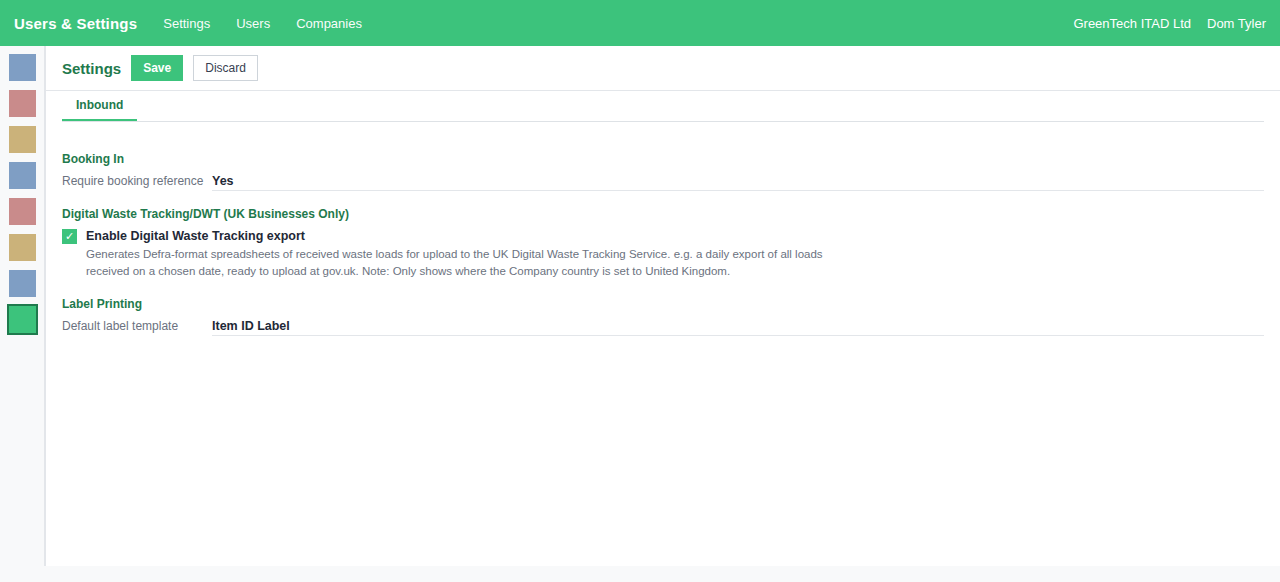
- Switch it on. Users & Settings > Settings > Inbound > Digital Waste Tracking (UK) > tick "Enable Digital Waste Tracking export". The section only appears when your company's country is set to United Kingdom.
- Enter your site permit number. On your company record, fill in "Waste Management Licence No (Site Permit Number)". Defra call this the Receiver's authorisation number and it appears on every report.
- Enter your waste carrier licence number on your company record, for loads you collect on your own vehicles.
- Set your default means of transport (normally Road). You can override it per return.
- Map your Item Processing Actions to Defra codes. Logistics & Inventory > Configuration > Item Processing Actions. Give each one its "Defra Disposal / Recovery Code", for example Recycle = R13, Parts Harvest = R12, Scrap = D15. R codes are recovery, D codes are disposal.
- Map your Package Types to Defra container types. Logistics & Inventory > Configuration > Package Types. For example a pallet cage maps to "[CAR] Carrier (for example, pallet cage)" and a skip maps to "[SKI] Skip".
- Check your EWC Codes. Asset Types & Services > Configuration > EWC Codes. Each code needs a Physical Form (normally Solid). Any code marked hazardous also needs its Default HP Codes (hazardous property codes, for example HP_6 Acute Toxicity). Tick "May Contain POPs" on any waste that can contain persistent organic pollutants, which are slow-degrading toxic chemicals found in some electrical plastics.
Your daily routine
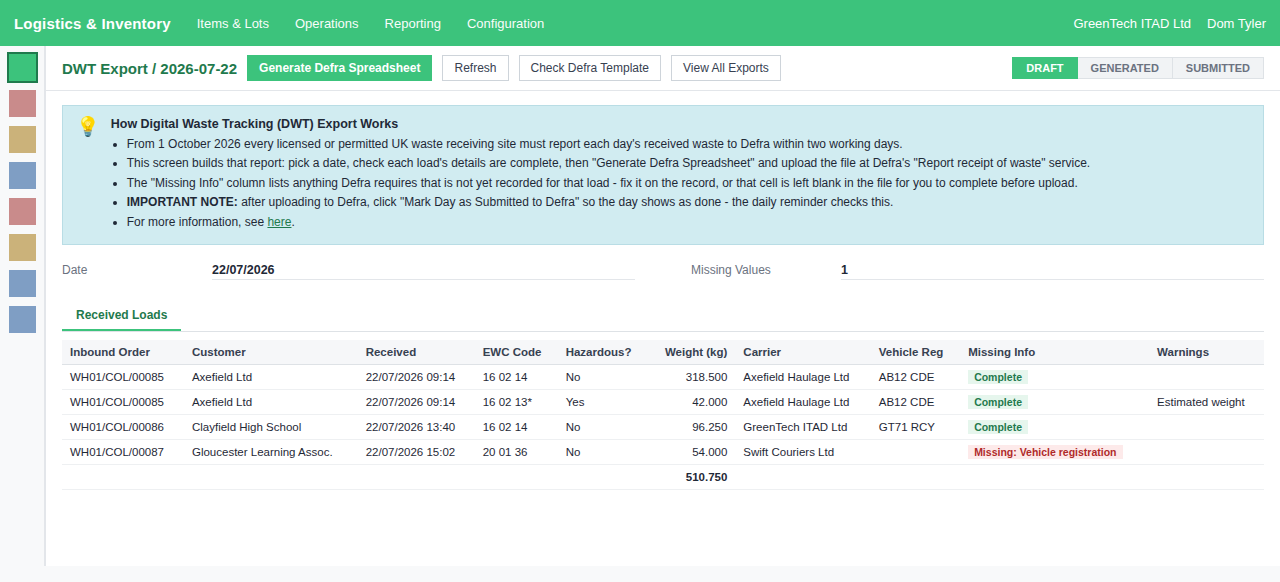
Logistics & Inventory > Operations > DWT Export.
- The screen opens on today's date and lists every load received that day, one row per load per waste code.
- Read the Missing Info column. It names anything Defra require that is not yet recorded. Fix it on the record it belongs to, then click Refresh.
- Click Generate Defra Spreadsheet. The file downloads in Defra's own format.
- Upload it at Defra's "Report receipt of waste" service.
- Come back and click Mark Day as Submitted to Defra. This is what tells RecyclyERP the day is done, and it is what the daily reminder checks.
If information is missing
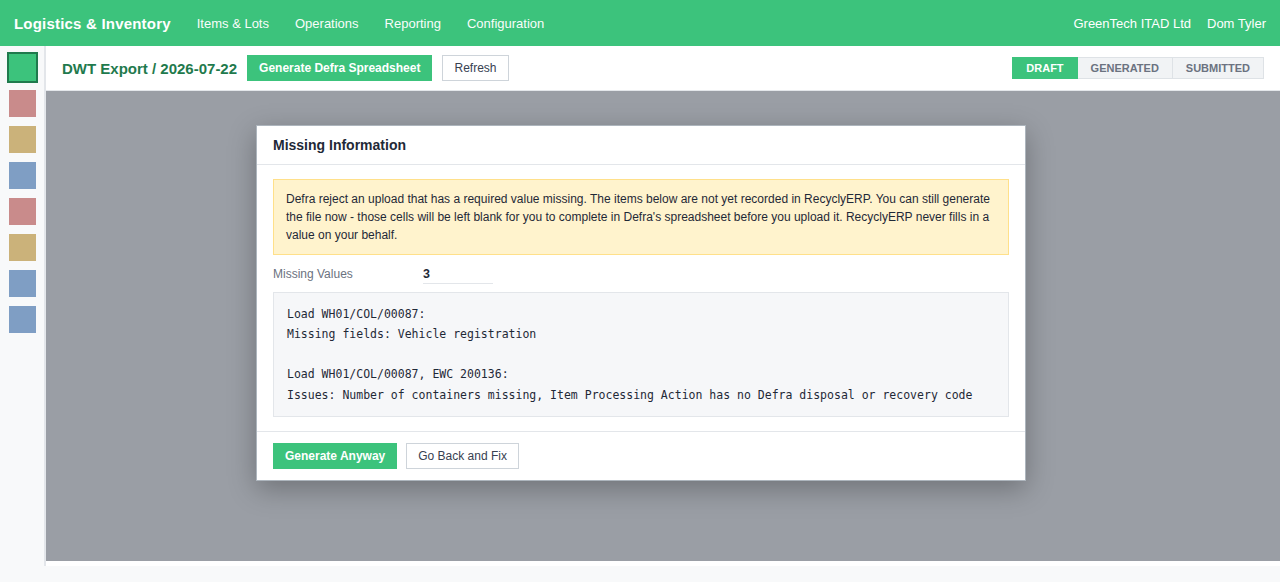
If anything Defra require is still missing, you are asked to confirm before the file is built. You can still generate it: those cells are left blank for you to complete in Defra's spreadsheet before you upload. RecyclyERP never guesses a value on a legal return.
The message is grouped by load, then by waste code within that load, so you can see at a glance which records need attention.
The common ones and where to fix them:
- Carrier, Carrier registration number, Vehicle registration - open the collection and complete its transport details. A courier needs a waste carrier licence number on their contact record.
- Number of containers, container type - the inbound order's Expected Packages, and the Defra Container Type on that package type.
- Item Processing Action has no Defra disposal or recovery code - set the code once on the action and every future export uses it.
- Weight missing or zero - weigh the items on the load.
- Hazardous EWC code has no HP codes - set the Default HP Codes on that EWC code.
- Hazardous load has no consignment code - the collection address needs its hazardous premises code.
The daily reminder
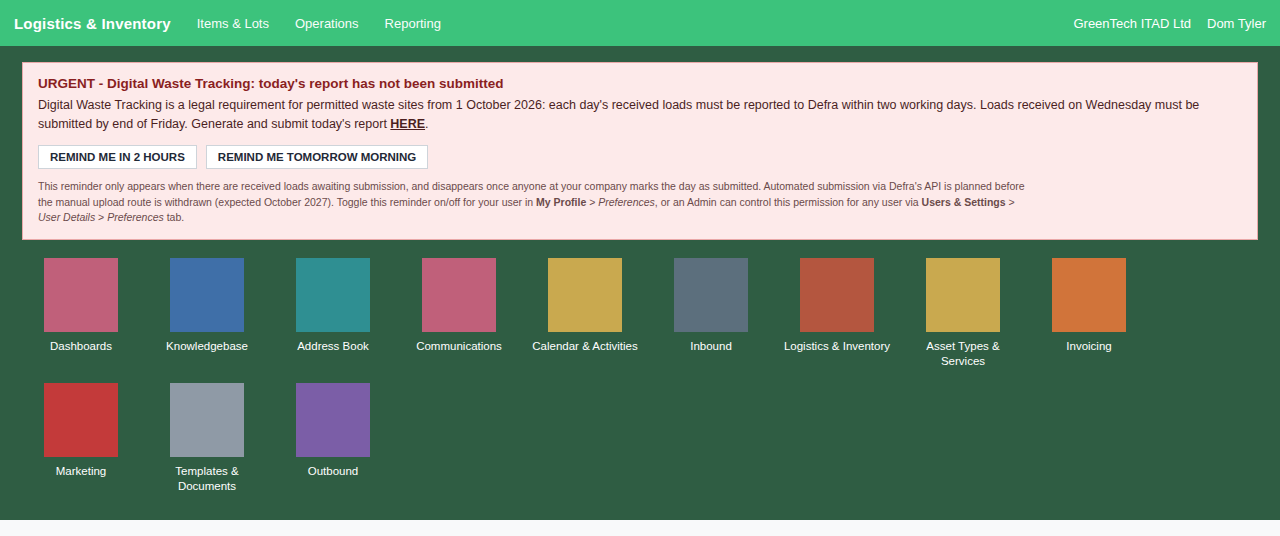
When a day's loads have not been reported, a reminder appears on the main apps menu. It becomes more urgent from the day after the loads were received, and names the day your deadline falls on.
You can put it off for two hours or until tomorrow morning. There is deliberately no longer option: Defra's deadline is two working days, so a longer delay could push you past a legal deadline.
Each person can turn the reminder off for themselves in My Profile > Preferences, and an administrator can set it for any user under Users & Settings > User Details > Preferences tab.
Checking past days
The View All Exports button lists every date you have exported, with its status and, where submitted, who marked it so and when. It is your record of having reported.
Use it to spot an unfinished day. "Generated" means the file was built but nobody confirmed it was uploaded. "Draft" means the day was opened but never generated.
Checking the export still matches Defra's spreadsheet
Defra's spreadsheet is still in beta and they can revise it. The Check Defra Template button runs a set of checks on your own system and tells you in plain English whether the export still lines up with their file, whether a test load writes and reads back correctly, and whether the file opens cleanly. It changes nothing and reads no customer data.
Worth clicking whenever Defra announce a change to their template. If it reports a failure, send the result to the Recycly team.
Things worth knowing
- Nothing is ever sent to Defra automatically. You generate the file and you upload it.
- A day only counts as reported once someone clicks "Mark Day as Submitted to Defra". RecyclyERP cannot see Defra's service, so this reflects what your team has recorded, not what Defra have received.
- Loads received after a day was submitted are flagged, so you can report them on the next return.
- Weights are reported in kilograms. If your system works in pounds they are converted for you.
- Defra intend to replace the spreadsheet upload with a direct connection. The manual upload route is expected to remain available until at least October 2027, and automatic submission is planned before it is withdrawn.
Key dates
- 1 October 2026 - mandatory for permitted and licensed waste sites, including receiving sites.
- October 2027 - carriers, brokers, dealers and exempt sites join, and the spreadsheet upload route is expected to be withdrawn around this point.